Introduction
It started with a desire to get at least one CVE issued at a time when bug bounties were closing. I arbitrarily downloaded an open-source project, instructed Claude-Code to read its Security.md, analyze/classify existing CVEs, and naturally received several vulnerability candidates similar to existing CVEs.
However, during the implementation and verification process, I confirmed that they were not vulnerabilities for various reasons. After wasting tokens so meaninglessly, I concluded that there were limitations to finding vulnerabilities through simple static source code analysis. I decided to create an open-source vulnerability analysis flow and use Local LLMs and MCP tools if necessary.
Coincidentally, among the open-source candidates I wanted to find vulnerabilities in, there was an AI flow open-source project called Flowise. Initially, I thought a project titled “Finding Flowise Vulnerabilities using Flowise” would be interesting, so I proceeded with it. However, due to the performance of Local LLMs and the difficulty of debugging, I ended up pursuing further learning and exploring different directions.
1) Test1 : Flowise & Local LLM(Qwen3:14b)
Settings
- Flowise In docker container
- Ollama
- Local llm model Qwen3:14b
- almost opensource llm model do not support tool calling or standard of MCP tool calling
- While setting it up, I realized how amazing commercial LLM services are.
- Burp Suite MCP
- MCP bridge to Flowise container (AI handmade, the given proxy and Burp Suite must follow a defined data format, but it didn’t match Qwen’s tool calling format, so I created a proxy)
Flowise
- Custom MCP node ⇒ Tools of the Tool agent Node
- The Custom MCP node calls Burp MCP through a self-made bridge.
- Ollama Node ⇒ Tool calling chat model of the Tool agent Node
- Qwen3:14b, set with a Context Window of 16k tokens.
- Buffer Memory ⇒ Memory of the Tool agent Node
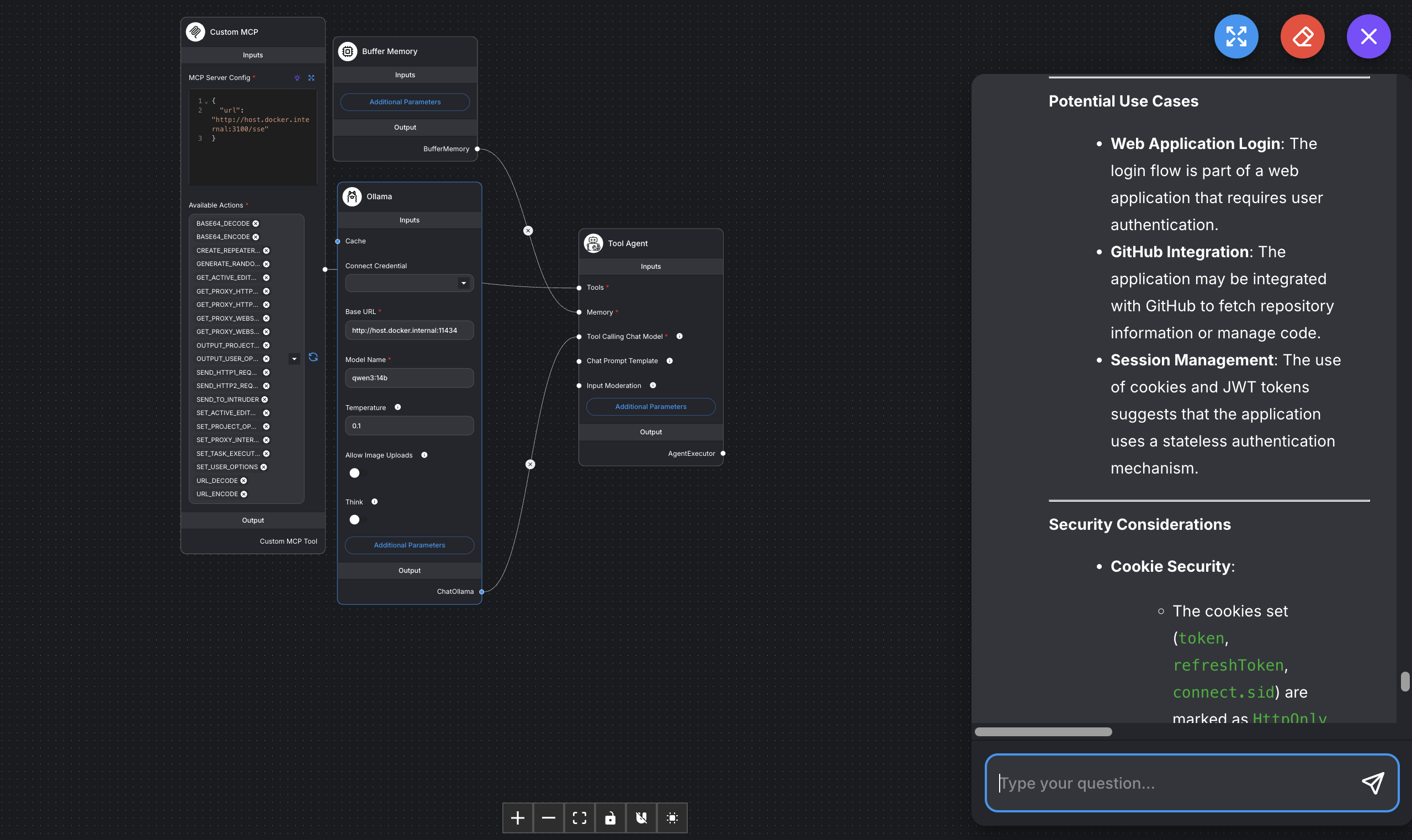
Test1 Challenging
- Local LLM Performance
- Difficulty understanding context due to insufficient token count.
- Unlike commercial models, it’s not proficient in using MCP tools; there are separate models that support tool calling.
- Meanwhile, I felt my MacBook, which rarely got hot, heating up.
- Lack of LLM Service Design Capability
- Started with the need to reduce commercial LLM usage, but ultimately lacked overall learning on how to handle agents, which LLM model is suitable, etc.
- Realized it was very difficult to harness even the MCP tool aspects in an insufficient state.
- Had no idea how to proceed with harnessing in Ollama.
⇒ Realized the need to set smaller goals and proceed. ⇒ It’s necessary to gradually establish a methodology for vulnerability analysis itself… and a lot of thought will be needed to run that part with local models. For Test2, I decided to try a simpler documentation task to get familiar with AI while studying it.
2) Test2 : Change LLM Model(gemma4:e4b) & Specify the purpose to use Local LLM
Test2 Project Goal : Create AI Vulnerability Security Review Items
Previously, I tried creating AI security review items with NotebookLM, but retrieving supporting clauses was unstable. I judged that even entrusting it entirely to Claude would be incomplete, so I decided to leave the draft generation and final review to Claude. I aimed to generate RAG with a Local LLM to accurately retrieve evidence and use the local LLM for simple, repetitive tasks.
Gemma4:e4b
- Model Memory Limit: My MacBook Pro uses VRAM and RAM together, totaling 24GB. Since I run iOS and other tasks simultaneously, I realized that memory space is not abundant. If the model itself is heavy, context limitations can occur, leading to very slow responses or responses going off-topic.
- While LLM performance is certainly important, I believe that harnessing is even more crucial for local LLMs that already have performance limitations.
- Speed: Aimed for fast speed by using e4b, which is designed for mobile/on-device use.
Thinking
- To do what I wanted, I needed to build some harnessing, so I looked into whether I could just use Claude-Code’s. Of course, some people had tried it, but the context would increase to at least 40k. The moment it runs on the cloud, it deviates from my goal of trying to proceed as much as possible locally / and my LLM context window is only 32k.
- Looked for other harnessing tools.
- Efforts to minimize context.
Flow
- Step1 (Claude) : Generate PDF to Text Python Script
> **참고자료**
> - `KISA` : 인공지능(AI) 보안안내서 (과기정통부·KISA, 2025.12)
> - `NIS` : AI보안 가이드북 (국가정보원, 2025.12)
> - `FSI-AG` : AI 에이전트 아키텍처에서 인증 및 권한관리를 위한 보안고려사항 (금융보안원, 2025.09)
> - `FSI-GL` : 금융분야 AI 보안 가이드라인 (금융보안원, 2023.04)
> - `FSC` : 금융분야 AI 개발·활용 안내서 (금융위원회, 2022.08)
> - `AI기본법` : 인공지능 발전과 신뢰 기반 조성 등에 관한 기본법 (2026.01.22)
> - `AI시행령` : 인공지능기본법 시행령 (2026.01.22)- Step2 (Claude) : Generate WIKI Structure
- Step3 (Claude) : Generate Prompt for Gemma e4b (summarize file by cutting to fit Gemma context length)
- Step4 (Gemma4) : Create WIKI (refer to reference materials txt file)
- Step5 (Claude): Draft security review items md file, referring to WIKI data.
- Step6 (Claude , Gemma4) : Review Final Markdown Table
- bge-m3:latest (local) — RAG Generation
- Generate RAG based on original text reference
- gemma4:e4b (local) — Heavy Repetitive Tasks
- Score md file based on WIKI and RAG (check if it’s in the actual report, if it’s appropriate)
- Claude Sonnet 4.6 — RAG Design, Distribute Calculation Tasks to Gemma4:e4b, Final Report Review and Modification
- Final Markdown Quality Review (referring to Scoring using RAG)
- bge-m3:latest (local) — RAG Generation
Scoring Result) These are the two items identified as partially satisfied through scoring.
It’s uncertain if the items were well-chosen, but the reasons are quite logical for now.
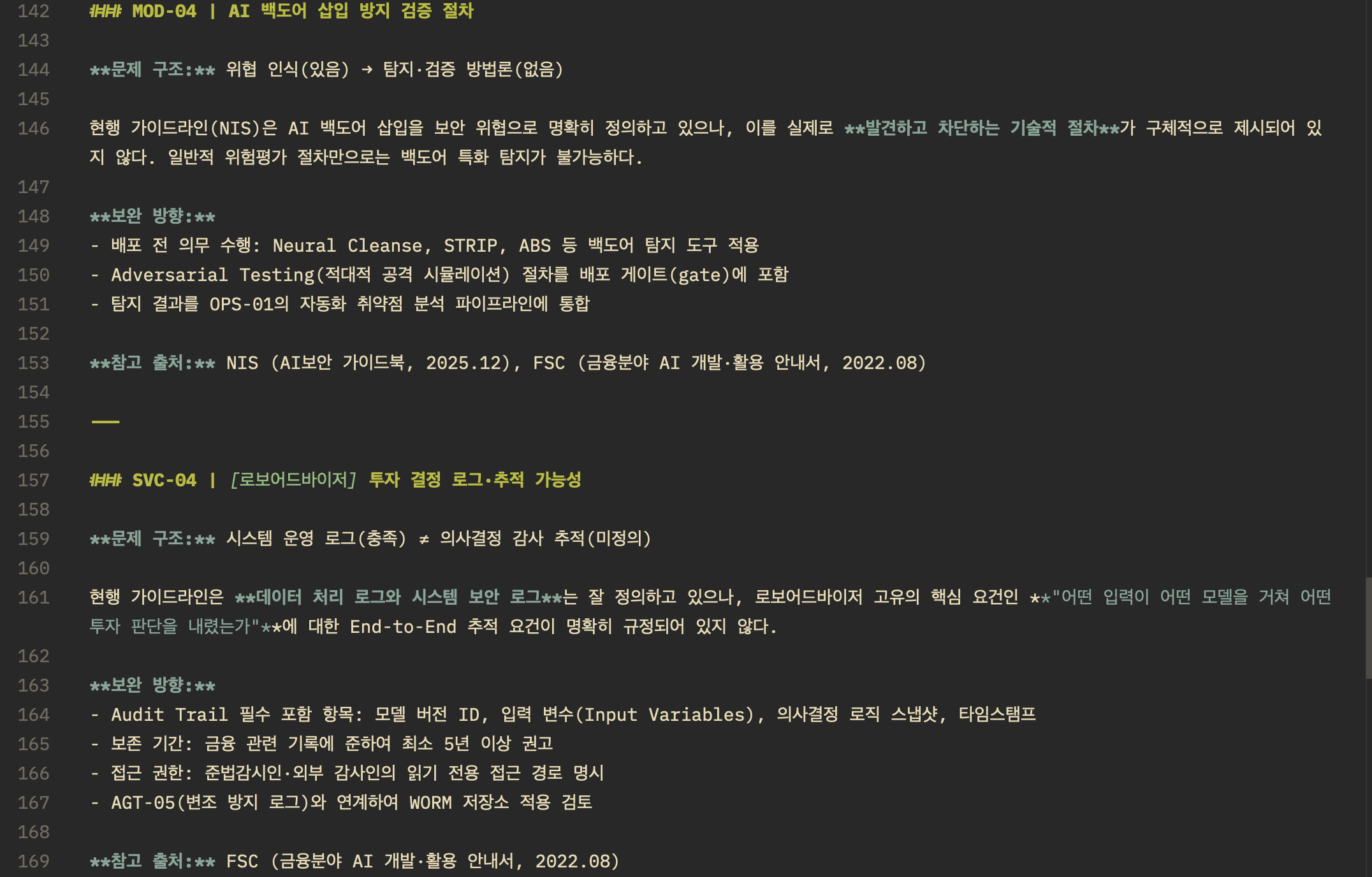
Test2 Results (Review and Vulnerability Checklist)
- Supporting documents were well-found and written.
- However, for the vulnerability checklist, it seems necessary to further develop the methodology by actually performing the checks. I want to ask AI practitioners at what point AI red teaming can be considered “good enough”…
Transclude of AI-보안성-심의-체크리스트.xlsx
Transclude of AI-vulnerability-checklist.xlsx
3) Find Vulnerabilities by Using AI
Find Vulnerabilities by Using AI
I wanted to summarize what I learned from the previous two tests (1 and 2) and use it when proceeding with 3). It’s not groundbreaking, but here’s a summary of what I actually felt:
- Use Local LLMs only for tasks with very clear, simple, and repetitive purposes.
- Always use commercial AI for tasks requiring thought and reasoning.
- The easier the MCP integration, the better.
- RAG is also good when semantic search and original source verification are needed.
- I understand the need for AI Agent Flow tools (Flowise, n8n, etc.), but if debugging is important, simple calls are more convenient.
- HIL (Human In the Loop) is more necessary than I thought for me, who uses Claude Pro (Claude is dumber than I thought).
- It’s difficult to find meaningful vulnerabilities by simply searching based on existing patch logs.
- Caveman skills save a lot of tokens.
- Initially, when analyzing an open-source project called Dify, I thought about building existing source code as RAG, and searching with existing security diffs (Before Code), but this was a thought I had without fully understanding AI. Contextual similarity does not imply code structure similarity.
- I conducted open-source reviews for Dify, plane, n8n, langflow, etc., and after some adjustments, the current FLOW is as follows.
Problem Definition
- Target: Appealing open-source projects
- Success Criteria: Reproducible PoC + Vulnerability Report + CVE ID Acquisition
Flow
During each phase, I record what was done within the phase folder. This can prevent sessions from breaking or duplicate findings when searching for candidates.
-
Phase1. Environment Setup
- Environment setup is performed first.
- Although my FLOW design skills are lacking, I judged that understanding what kind of service the open-source project is, is necessary first.
- Set up with Docker / AWS, and if there’s an account, try setting up the account with various permissions.
- Briefly grasp the open-source structure and write a readme about it.
-
Phase2. Vulnerability Information Discovery
- Existing Vulnerability Discovery
- Utilize GitHub API to check GitHub security advisories and security commit logs.
- Save vulnerabilities in the correct format ([CVE/GHSA ID] | [Type] | [Affected Module] | [Vulnerability Pattern] | [Fix Method]).
- Count by type to set priorities.
- Identify areas likely to contain vulnerabilities.
- New features
- New files
- Attack surface grep (file/upload/request, etc.)
- Existing Vulnerability Discovery
-
Phase3. Information-Based Vulnerability Candidate Location Discovery + In-depth Analysis
- For parts found in Phase 2 existing vulnerability priority order + Phase 2 new files:
- Extract code characteristics from CVEs and grep.
- semgrep
- Claude performs in-depth analysis of the vulnerability candidates found above.
- Check where function input values originate from.
- Create final vulnerability candidates.
- For parts found in Phase 2 existing vulnerability priority order + Phase 2 new files:
-
Phase4. By Design Filter
- While searching for vulnerabilities, there were cases where the maintainer explicitly stated in Security.md that something was “Out of Scope” or “by design” for issues raised.
- I reviewed Security.md and designs related to the found vulnerability candidates.
-
Phase5. Vulnerability PoC
- Plan and get approval to actually perform PoC for the found vulnerability candidates.
- I was told to ask for human help if needed during further progress.
Reported 3 vulnerabilities, currently waiting… (05/29)
- Project with 150K: Triage response and action DRAFT in progress (6/4~)
- Project with 50K: Confirmed main branch merge after action, received new GHSA number, not yet an issue (6/24)
- Project with 200K: Replied that it would take a long time due to being too busy… but it seems similar vulnerabilities were patched later in related code (6/20~). It definitely feels like AI has overloaded security personnel with work…
Lessons Learned from this Project
-
When using AI, harnessing is as important as performance.
- The purpose of using AI must be clearly defined.
- Output and input formats need to be fixed to achieve that purpose.
- Identify AI bottlenecks and control prompts or memory (constantly waiting for unnecessary things).
- It’s okay for things to take a little longer, but if you can’t wait for work to progress, you need to review whether it’s actually a task worth waiting for every 5 minutes using a project md or a separate workflow, or proceed while logging.
- If the above problem definition is clear + there are enough tokens (financial resources) or computing power to run multiple agents, I think agentic engineering might be somewhat possible…
-
Issues arising from AI agentic engineering capabilities
- Although authentication/authorization was important, with increased server-to-server communication, the probability of vulnerabilities arising not only from client authentication but also from all end-to-end verification increases.
-
It’s necessary to consider methodologies for AI risk assessment (practical inspection methods), or the ability to design control over the values output by LLMs during design (harnessing).
-
Open-source analysis using AI is possible, but I’m skeptical about using AI to find vulnerabilities in internal systems as a person in charge in the future. A huge number of vulnerability candidates will emerge, and only the person reviewing them will suffer. This project also took about 30 hours to verify meaningful vulnerabilities out of 10 candidates…
-
It seems that conducting triage using AI, and skills such as software architecture ability to structurally eliminate vulnerabilities, or the ability to manage various authorization authentications in Cloud/Container environments, will become important.